
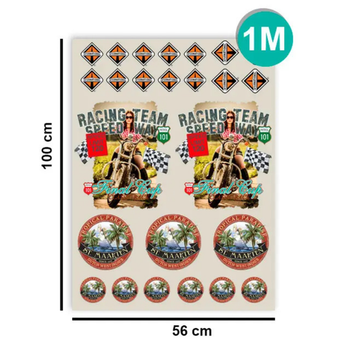


Send your ready DTF board - by the meter (Textile)
Order in 3 steps
- Quantity: the more you order, the lower the price.
- Your file: transparent PNG, 300 DPI, 20 MB max. Several designs? Put them on one sheet.
- Add to cart: we check your file for free.
No print-ready file? Build your sheet online (free)
Please add your file, or tick the WeTransfer box if your file is over 20 MB.
Couldn't load pickup availability
Estimated Shipping Widget will be displayed here!
Installation tips

- Start by preparing your fabric, making sure it is clean, dry, and free of any debris or lint.
- Preheat your heat press to the appropriate temperature for the type of garment you are using. We recommend an initial 5-second press for polyester, softshell, and blends.

- Place the DTF transfer onto the garment, image side up, and align it according to the desired location.

- Place a protective sheet over the transfer, for example a Teflon sheet or parchment paper for a heat press.

- Close the heat press and apply the appropriate pressure and time depending on the type of garment and transfer you are using.

- Once the time has elapsed, open the press and carefully remove the protective sheet.
- Inspect the transfer to ensure it has adhered properly. If necessary, run the heat press over it for a few seconds to ensure good adhesion.

- Well done! The product is ready to be sold.
Delivery
At Imprime Ton DTF, we understand the importance of receiving your orders as quickly as possible. That's why we ship all orders via Chronopost Express, ensuring your creations are delivered within 24 hours (business days, after dispatch, in Metropolitan France).
Returns & Customer Service
Order your print-ready DTF sheets in A4, A3 or by the metre, for sharp, durable textile transfers suited to all your projects. Ideal for textile printing professionals, brand creators, resellers and customisation workshops.
DTF sheet features:
- High-definition (HD) printing with vivid colours and ultra-precise details
- Premium STS Inks for optimal wash durability
- Premium DTF film, compatible with all types of textiles (cotton, polyester, blends, light or dark fabrics)
- Easy heat application (standard heat presses – instructions provided)
Benefits:
- No minimum order: order from 1 sheet or in multiples of metres
- Fast shipping to France, Europe and the French overseas territories
- Responsive customer service to support your creations
🔧 How to use: Send us your print-ready designs or build your sheet directly on our website with our online tool. Ordered before 11am: printed the same day (business days).
Bring your designs to life with our DTF by the meter service, ideal for textile professionals, designers, and brands looking to maximize print space and reduce costs. Simply send us your ready-made DTF file , and we'll print it on high-quality DTF film , sold by the linear meter.
Thanks to our professional printing technology, your designs stand out with vibrant colors , excellent sharpness , and long-lasting adhesion on all types of textiles (cotton, polyester, blends, etc.). It's the perfect solution for producing complete, repeating, varied sheets, or sheets combining multiple designs on a single meter.
Advantages of DTF per meter
- Maximum surface optimization : place as many visuals as you want on your file.
- High-resolution printing for a professional finish.
- Vibrant colours and excellent hold after washing .
- Compatible with all textiles (cotton, polyester, mixed).
- Ideal for large series and large volumes .
How does it work?
- Create your print-ready DTF sheet using your software (Photoshop, Illustrator, Canva…).
- Export your file according to our instructions .
- Download it when you place your order.
- We print as supplied , without modification.
Important to know
- 1 quantity = 1 linear meter of printing.
- For several meters, simply increase the quantity.
- Your files must conform to the file preparation guide .
🖥️ File formats and compatibility:
- Accepted formats : .ai, .psd, .pdf, .tiff, .png
- Unsupported formats : .jpg, .cdr
- Vectorized fonts : all fonts must be vectorized or embedded.
- File naming : use a clear name to facilitate processing (e.g., Brand_Name_Visual1)
- Spelling : Please proofread all texts carefully; no corrections will be made.
🎨 Graphic design preparation of the visual
- Background transparency : delete all background layers, do not flatten the image
What will be printed: only the elements visible on a transparent background will be included.- Recommended resolution: minimum 300 dpi for optimal quality
- Dimensions: Respect the final dimensions without cutting lines or markings.
🌈 Colors and printing
- Required color mode: CMYK only (RGB for .png files)
- RGB not accepted (except .png): automatic conversion may result in dulled colors and loss of brightness.
- Screens vs. printing: colors on screen (in RGB) may differ from the final result (in CMYK).


Frequently Asked Questions
Which DTF format should I choose for my prints?
The A4 format is perfect for small logos or tests. A3 is suitable for most standard designs. The meter format is ideal for professionals who want to optimize space with a large sheet.
Do tiered discounts work if I have several different files?
Yes. For all our DTF formats, discounts are calculated on the total quantity ordered in that format , even if your files are all different.
You do not have to print the same image multiple times to benefit from the volume discounts.
What type of fabric can be used with DTF boards?
Our DTF transfers can be applied to cotton, polyester, blends, denim... and are suitable for light or dark garments.
Can I order just one board?
Yes, there is no minimum order . You can order an A4 sheet, A3 sheet, or start with 1 meter . Quantities are completely flexible.
How do I prepare my file for printing?
You can access the preparation instructions here . You can also create your board directly online using our creation tool .
What are the shipping times?
Ordered before 11am (business days): your order is printed the same day, then shipped by Chronopost.
Why choose Print Your DTF?
✔ High-end products
STS/MUTOH hardware and STS Inks consumables for precise and consistent rendering.
✔ Premium quality at competitive prices
High-end films, inks and powders, with some of the most attractive prices on the market.
✔ Sliding scale discounts
Combined quantities even with different visuals. Best prices guaranteed.
✔ Expert support
A responsive and available team to help you: files, formats, installation, compatibility, optimizations.
Our Transfer Presses
Discover our selection of transfer presses and accessories, perfect for optimizing your DTF prints and ensuring professional quality results.


Going further with DTF Textile
Formats d’impression DTF textile
A4, A3 et impression au mètre pour tous vos projets de personnalisation textile.
Créer ma planche (outil gratuit)
Placez vos visuels, optimisez votre planche et gagnez du temps grâce à notre éditeur en ligne.
Envoyer ma planche prête
Pour les utilisateurs qui maîtrisent déjà la préparation de leurs fichiers.
Guide pose & préparation textile
Réglages, températures, pressage et conseils professionnels.
Compatibilité des textiles
Découvrez les matières compatibles, celles à éviter et nos recommandations.
Forfaits DTF (50 m / 100 m)
Idéal pour réduire vos coûts d’impression sur le long terme.
Quel format DTF choisir : A4, A3 ou au mètre ?
Découvrez quel format DTF choisir selon votre projet : logos, séries, marques, volumes. Comparatif complet + conseils.
Apprenez à créer une planche DTF optimisée.


)